If you wish to order one of my Blurb Books

If you wish to order one or more of my Blurb Books click on the link below

http://www.blurb.com/user/store/misto?filter=bookstore

The above link will then take you to my bookstore.

Sunday, June 28, 2009

Corn Cob and Zinnias


TAKE ADVANTAGE OF WHAT IS AVAILABLE!

We had a few ears of corn given to us a couple of years ago.

I decided to try and photograph the gift.

I took two cooking pans I had purchased earlier at a thrift store. I then took a few white zinnias from my garden and placed them in a red and white teapot. I cut some corn off of the cob and I started photographing.

About the only thing I did to this image was to take out a few blemishes from the wood and softened the image a bit.


Challenge for today:

This is summer. Start photographing some vegetables or fruit!

Friday, June 26, 2009

Love those Peonies

IS LESS WILD BETTER??????

For today's image I am going to let you decide what you like.

The above image is what I call "a toned down image." If you would refer back to my posting of June 11, you would find what I term as a "wild" image. The flowers and the basic background of today's posting and the posting of June 11 are the same BUT the image of June 11 is a much wilder version of the above image.

Actually the above image has just enough of the added textured layer showing to give the image sort of a painted look. The colors and shape of the flowers and crock are completely in view. However, the shape and colors of the crock and flowers in the June 11 image are NOT nearly as identifiable as they are in today's image.

I'm not saying these images are "art".........and yet, people DO have a preference in what they like in art. And the good thing about photography and computers is that you have more of a chance to please the various tastes of viewers.


Challenge for today:

Try and turn a basic image into 2 images to please to two spectrums of viewers.

Thursday, June 25, 2009

Summer Bouquet


USING WHITE POSTER BOARD AS A BACKGROUND

It really does help to know WHAT your plans are with an image AFTER you photograph it so you know how to set up the image.

I wanted an image that had some empty space for text.

So I photographed a clear vase/flowers against white poster board.

After I uploaded the image into the computer I chose a textured background and made it to be a layer. I then adjusted the layer's opacity so it added just enough color to make the total image interesting. But I didn't want the added texture/color to overpower the flowers and the text I would later add.


Challenge for the day:

Start a collection of colored poster boards - but start out with white.

Thursday, June 18, 2009

Bowl of Oatmeal and Raspberries


EXPLORATION IN PHOTOGRAPHY!

This day and age of digital photography it is much easier to really let the "inner you" come out. One of the main reasons for that is you don't have the film and processing costs to contend with anymore. Of course you may be one of those many individuals who have digital images converted over at Wal-Mart and actually printed out as pictures - BUT at least you have the option.

When you don't have to conserve on the actual costs of your photo taking session, then you are really free to explore the creative composition of your still life pictures.

A lot of times I find myself working around a theme in photos until I've grown tired of a particular type of images.

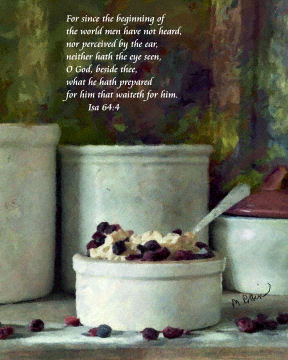
The above image was one of the results of a series I did with old crocks and food.

This image was done using an old dresser, old wood, old crocks, and fresh food.

I placed an old board down for the surface and placed some old boards against the dresser's mirror and used those old boards for the backdrop.

I arranged the old crocks and got out a newer bowl which had a cranberry colored lid. If you notice that cranberry lid goes well with the raspberries - especially that little one to the left the oatmeal bowl.

I actually did make up a bowl of oatmeal and then I got some frozen raspberries out of the freezer.

After I scattered some sugar and some raspberries on the old board, I was ready to start clicking away.

After I chose an image I liked and got it uploaded into the computer, I chose a background I had created made out of just colors and placed it as a layer onto the image I had just taken.

I then worked with the "color layer" and with the original image for awhile until I got just the right look - the wood used as the backdrop has a lot of the "color layer" and the rest of the image has a lot less of the "color layer."


Challenge for today:

Go ahead and photograph some food!

Wednesday, June 17, 2009

In Remembrance


TO HELP EASE THE PAIN

When my father died at the age of 93, I decided to photograph some of the plants that were given in honor of him and use them as "thank you" cards.

You don't need to tell me that that type of thing sounds like a terrible thing to do. Yet, it really did help me in my grief by making something pretty out of the plants and it also occupied my time.

The above image was sent by a few of my dear co-workers.

I photographed the plant with some red books. (I thought the red in the flower would look prettier if the books were of the same color.)

The background was a very light colored blank wall. The wood behind the plant was an open door.

I placed one of my created backgrounds as a layer over the photograph and then I erased everything on the layer except I did allow the background to replace the blank wall.

The final image result looks like the plant is in front of a view of the sky.

And this is an image in memory of my father and the kindness of my friend's in my sorrow.


Challenge for today:

Remember that Father's Day is coming up. Photograph something that has happy memories that belongs in his past.

Thursday, June 11, 2009

Wild Peonies


HAVE MORE THAN ONE VERSION OF AN IMAGE!

This image IS different from yesterday's peonies, but I did use the same crock and the same window curtain as the background.

Peonies seem to demand to be shown as being delicate even if they are in a dark setting. So I worked up the image of these peonies in a delicate image by using Paint Shop Pro's arithmetic effect.

BUT....BUT....BUT....the above image is AFTER I used the arithmetic effect and after I darkened the arithmetic effect but BEFORE I did anything else and definitely before I started toning the image down.

Again let me explain what "arithmetic" means. In Paint Shop Pro you take 2 images of the same size. (I used the peonies image and then an image which was composed of strokes which were made up of random colors - done in Microsoft Photodraw.) Then in Paint Shop Pro you have a choice of 3 different arithmetic options: 1. an average of the 2 images, 2. the darkest of the 2 images, or 3. the lightest of the 2 images. (Actually there are other options, but I don't understand them.)

For the above image I did an average of the 2 images - this is the option I generally use.

Of course after I do the first arithmetic effect and the first initial darkening procedure I then start toning down the arithmetic effect. It just seems to me that the darkening of the arithmetic effect ends up helping the overall final result.

If you find yourself using the arithmetic effect in Paint Shop Pro you will find the first arithmetic version really comes out looking more like a wild painting (especially if you darken it).


Challenge for today:

Download a free trial version of Corel Paint Shop Pro .

Wednesday, June 10, 2009

Peonies in a Crock


NOTHING LIKE AN ABUNDANCE!

One of the neat things about peonies is that they have such large blossoms! It doesn't take too many to make you feel like you have a lot and when you actually have a lot......

I didn't plant these peonies, but I'm glad someone did. I do like white peonies; however, the pale pink peonies have such a delicate look about them.

In composing this picture, I used as the material a see through curtain I bought as some thrift store.

Since I wanted to make sure that the light colored peonies wouldn't fade in the background, I used the darker colored peonies and the sage(?) to help break the curtains from the rest of the flowers.

After I chose a picture I liked and got it uploaded into the computer, I made a layer out of another image I had worked on and pasted it on the peonies image. Then I worked with the layer and peonies photo a while.

When I finally got the right combination of layer and peonies, I printed the result out and admired it for awhile!


Challenge for today:

Go to a thrift store and look for some good cheap curtains you can later use.